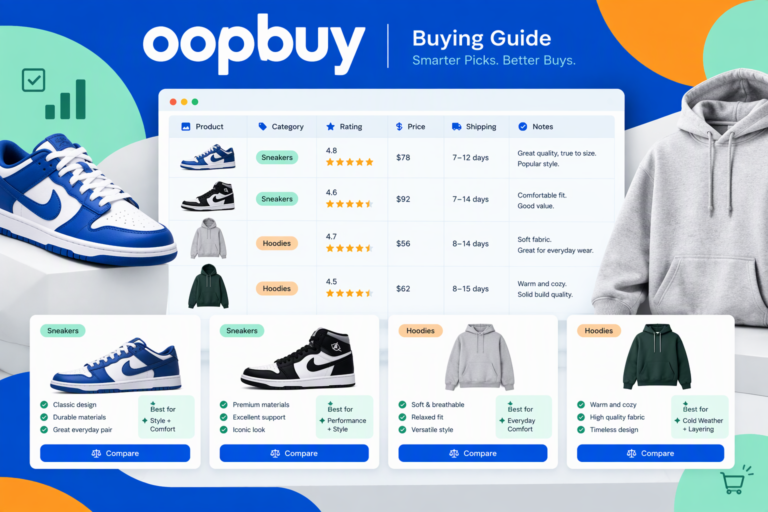
oopbuy sheets are one of the most useful tools for anyone shopping from Chinese marketplaces. Instead of searching through endless product pages, you get a tidy list of tested links, prices and notes. But if you have never used one before, the rows and columns can look a little overwhelming. This article explains how oopbuy sheets work, how to read them quickly and how to use them to save money. For the complete purchase walkthrough, visit our oopbuy Spreadsheet home page.
What Are oopbuy Sheets?
oopbuy sheets are curated spreadsheets – or spreadsheet-style web pages – that list products from Weidian, Taobao, 1688 and Pinduoduo together with direct oopbuy purchase links. They are created by experienced buyers who have already ordered, checked and often reviewed the items. The result is a shortcut: you skip the research phase and go straight to products that other shoppers already trust.
Our own version, the oopbuy Spreadsheet, turns the classic spreadsheet into a visual website with photos and categories, which makes it easier to browse on mobile.
How to Read oopbuy Sheets: Column by Column
| Column | What it tells you |
|---|---|
| Photo | A preview of the item – often a real buyer photo rather than a studio image |
| Item name | A short English description, e.g. “Heavyweight boxy hoodie – grey” |
| Price | Approximate item price in CNY or USD, excluding international shipping |
| Platform | Where the seller is: Weidian, Taobao, 1688 or Pinduoduo |
| Link | The direct oopbuy link to order the item |
| Notes | Sizing advice, color options or quality comments |
Not every sheet uses every column, but these are the most common. The notes column is often the most valuable: a short comment like “fits true to size” or “order one size up” can save you from an expensive mistake.
How to Filter oopbuy Sheets Quickly
By category
Start with the section you need. Our categories cover T-Shirts, Pants/Shorts, Headwear, Accessories and more, so you never scroll through items you do not want.
By price
Set yourself a budget per item. Basic tees and caps are usually inexpensive, while sneakers and jackets cost more. Remember to leave room in your budget for international shipping.
By weight
This is the filter many beginners forget. Because shipping is charged by weight and size, a lightweight T-shirt costs far less to deliver than a pair of boots. If you are on a budget, mix heavy items with light ones.
By platform
Some buyers prefer Weidian for niche fashion sellers, 1688 for factory prices on basics, and Taobao or Pinduoduo for variety. Our oopbuy Links guide explains the differences between each platform.
How to Spot Reliable Items in oopbuy Sheets
- Look for real photos. Items with buyer or QC photos are generally more trustworthy than those with only studio images.
- Check notes for repeat purchases. Comments such as “ordered twice, consistent quality” are a good sign.
- Compare similar listings. If one price is dramatically lower than the rest, check the details carefully.
- Use QC photos. No matter how good a listing looks, always review warehouse photos before shipping.
Money-Saving Tricks with oopbuy Sheets
- Build a wishlist first. Copy links from the sheet into a note, then order everything at once.
- Ship together. One combined parcel is almost always cheaper per item than several small ones.
- Remove packaging. Ask the warehouse to remove shoe boxes and extra packaging to cut volume weight.
- Use coupons. Agents often give shipping discounts to new users or during seasonal sales.
- Time your orders. Avoid ordering right before Chinese New Year, when many sellers pause shipping.
A Simple Workflow for Using oopbuy Sheets
Experienced buyers tend to follow the same routine every time they shop, and it works just as well for beginners. First, they decide what they actually need – for example, two tees, one hoodie and a cap. Next, they open the matching categories and shortlist two or three options for each item. Then they compare notes, prices and weights before choosing a final pick. Finally, they order everything on the same day so the items reach the warehouse together and can be shipped as one parcel.
This routine keeps you focused, prevents impulse buys and makes the most of combined shipping. It also means you can review all QC photos at once and make better decisions about exchanges before your parcel leaves China.
oopbuy Sheets vs. Searching Yourself
You can of course search Taobao or Weidian directly. But it takes time, product titles are in Chinese, and it is hard to tell which seller is reliable. oopbuy sheets give you a pre-filtered starting point. Many experienced buyers use both: they start from the sheet and only search manually when looking for something very specific.
Conclusion
Once you know how to read them, oopbuy sheets turn a complicated shopping process into a simple one. Focus on the notes column, filter by category and weight, and always ship in combined parcels. For a full step-by-step buying process, return to the oopbuy Spreadsheet homepage. Want inspiration? Check our best oopbuy finds, or learn the basics in the oopbuy Spreadsheet Guide.